
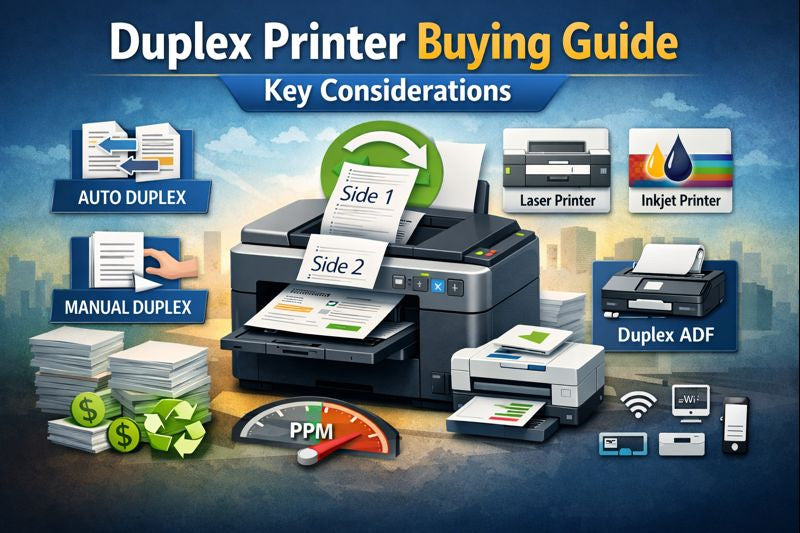
A duplex printer is a device capable of printing on both sides of a sheet of paper (double-sided printing). This feature is crucial for saving paper, reducing costs, and creating professional-looking documents. When shopping for one, understanding the key features and your specific needs is essential.
Duplex Printer Buying Guide: Key Considerations
1.Type of Duplexing:
The most important distinction is how the printer handles double-sided printing:
- Automatic Duplex Printing (Auto Duplex): The printer has a built-in mechanism (a duplexer) that automatically flips the paper after the first side is printed, printing the second side without user intervention. This is the most convenient and time-saving option, ideal for high-volume users and offices.
- Manual Duplex Printing: The user must manually take the paper stack, flip it, and reinsert it into the tray to print the second side. While this is less efficient, it's a feature sometimes available on lower-priced models.
2. Printer Technology: Inkjet vs. Laser
Your printing volume and type of document will dictate the best technology:
Laser Duplex Printers:
- Best for: High-volume text-heavy documents (reports, invoices, contracts).
- Pros: Faster print speeds, lower cost per page (toner lasts longer), excellent text quality, durable.
- Cons: Higher initial cost, generally not as good for high-quality photo printing.
Inkjet Duplex Printers (including Ink Tank/MegaTank models):
- Best for: Mixed use, including documents and high-quality photos/graphics.
- Pros: Lower initial cost, better color/photo quality, and ink tank models offer very low running costs.
- Cons: Slower print speeds, ink cartridges can be costly (for standard models), risk of clogs if not used regularly.
3. Additional Duplex Features
- Automatic Duplexing Document Feeder (ADF): If the printer is an All-in-One (AIO) and you need to scan or copy multi-page documents double-sided, look for an Auto-Duplexing ADF.
- Single-Pass Duplex ADF: Scans both sides of the page in one pass (fastest).
- Reversing Duplex ADF: Scans one side, flips the page, and then scans the second side (slower, but still automatic).
- Duplex Binding Style: Check if the printer settings allow you to choose between Long-Edge Binding (for most documents) and Short-Edge Binding (for calendars, booklets, etc.) for correct page orientation.
4. Speed and Volume
- Print Speed (PPM): Pages Per Minute. Higher PPM is essential for offices or high-volume users. Note that the duplex print speed is typically slower than the simplex (single-sided) speed.
- Recommended Monthly Page Volume/Duty Cycle: This indicates how many pages the manufacturer recommends printing per month for the printer's longevity. Match this to your estimated print volume.
5. Connectivity
- Wi-Fi/Wireless Connectivity: Allows printing from computers, smartphones, and tablets across a network. Essential for a modern home or office.
- Wi-Fi Direct/Bluetooth: Allows printing directly from a device without needing a router.
- Ethernet: Provides a more stable, wired network connection, common in office models.
Duplex Printer FAQs
Q: What is the main benefit of duplex printing?
A: The primary benefits are cost efficiency (using up to 50% less paper) and environmental sustainability (reducing paper waste). It also gives multi-page documents a more professional and streamlined appearance.
Q: How do I know if a printer has automatic duplexing?
A: Look for the term "Auto-Duplexing," "Automatic Duplex Printing," or "2-Sided Printing" in the product specifications. If it only says "Duplex Capable" or doesn't specify "Automatic," it may be manual.
Q: What is the difference between print duplexing and scan duplexing?
A: Print Duplexing is printing on both sides of the paper.
Scan Duplexing is the ability of an All-in-One (AIO) printer's Automatic Document Feeder (ADF) to scan both sides of an original document. This is crucial if you frequently need to scan double-sided paperwork.
Q: Are duplex printers more expensive?
A: Printers with automatic duplexing typically have a slightly higher initial cost than their non-duplex counterparts due to the extra mechanical component (the duplexer). However, the long-term savings on paper usually offset the extra upfront cost, especially for medium-to-high volume users.
Q: Why do my pages come out misaligned when duplex printing?
A: Misalignment can occur due to several factors:
Incorrect Paper Type/Weight: Using paper too thick or too thin for the printer's specifications can cause feeding issues.
Improper Loading: Ensure the paper is loaded correctly and the paper guides are snug.
Printer Driver/Firmware: Outdated drivers or firmware can sometimes cause software-related alignment errors.
Find Your Perfect Duplex Printer at OZ Toner Australia
Now that you know the key features to look for—Automatic Duplexing, technology type (Laser vs. Inkjet), and necessary ADF capabilities—it's time to start comparing models!
Top-Rated Automatic Duplex Printers
The right choice depends heavily on your primary use: text/volume (Laser) or color/photo (Inkjet/EcoTank).
Top 3 Duplex Colour Laser MFPs
Laser printers excel at fast text and graphic documents, high durability, and are typically best for professional environments with high print volume.
| Printer (Brand/Model) | Key Features | Best For |
| HP Color LaserJet Pro MFP 4301dw | Fast print speeds, excellent print quality, single-pass duplex scanning, secure printing features. | High-Quality Business/Workgroup. Known for robust performance and sharp text/graphics. |
| Brother MFC-L3755cdw | Fast colour printing, auto-duplex printing/scanning, large paper capacity options, very reliable. | High-Volume & Reliability. A workhorse printer for a busy office needing a durable machine with competitive toner costs. |
| Kyocera ECOSYS M5526cdw | Extremely low running costs (long-life drums), auto-duplex printing/scanning, known for durability and low waste. | Lowest Long-Term Running Costs. Best choice if your main priority is minimal cost-per-page over the printer's lifetime. |
Top 3 Duplex Colour Inkjet MFPs
These models are often from the 'MegaTank' or 'EcoTank' style (supersized refillable ink tanks) or business-focused cartridge systems, known for lower running costs and high-volume capacity.
| Printer (Brand/Model) | Key Features | Best For |
| Canon MAXIFY G4670 MegaTank | 4-in-1 multifunction: print, scan, copy and fax. Refillable MegaTank ink system for ultra-low cost per page. Compact design. | High-Volume Small Office/Home Office (SOHO). Excellent cost-per-page and productivity features. |
| Brother MFC-J6540DW | Prints up to A3 size, auto-duplex printing (A4/Letter), high-speed printing, uses INKvestment Tank cartridges. | Versatility & A3 Printing. Great for those needing occasional larger prints and reliable performance. |
| HP Smart Tank 7605 | Integrated refillable ink tanks, auto-duplex printing, includes an Auto Document Feeder (ADF), compact design. | Cost-Effective Home/Family Use. Excellent for general purpose, moderate-to-high volume printing with very low ink costs. |