
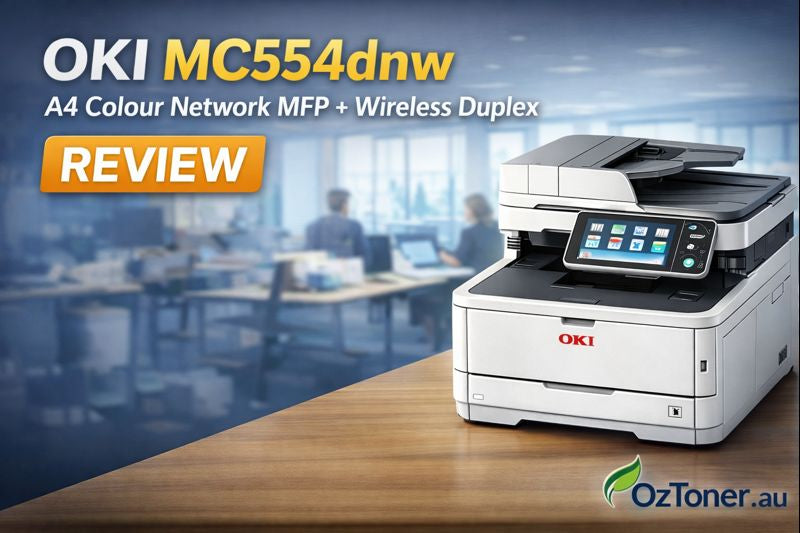

A4 Colour Wireless Duplex MFP for Modern Offices
OKI has introduced a new-generation A4 colour multifunction printer for office workgroups: the OKI MC554dnw A4 Colour Network MFP + Wireless Duplex (Product code: YB8001-7004P003). This model is designed to simplify everyday workflows with strong print speed, faster scanning, and modern connectivity — all in a compact office-friendly footprint.
If your team is upgrading from older OKI A4 colour MFPs like the MC563dn or MC573dn (now discontinued in many markets), the MC554dnw is a practical step forward — especially for scan-heavy offices and wireless-first environments.
At a Glance: Why the MC554dnw Stands Out
- Fast print/copy performance up to 32 pages per minute for busy offices.
- High-speed single-pass scanning up to 30 ipm simplex and 42 ipm duplex.
- Easy-to-use 4.3” colour touch panel for intuitive walk-up operation.
- Simple IT integration with Windows, macOS, and mobile platform compatibility.
- True all-in-one workflow: print, scan, copy, and fax from one device.
Print & Copy Performance: Built for Daily Workgroup Demands
The MC554dnw targets small-to-mid workgroups that print consistently throughout the day. With print/copy speeds up to 32ppm, it supports everyday office tasks like quotations, invoices, proposals, training materials, and customer-facing colour documents without slowing your team down.
Who it’s ideal for
- Reception + admin teams producing daily customer documents
- Sales offices printing colour brochures, presentations, and forms
- Service businesses that scan & archive jobs, invoices, and agreements
- Schools, clinics, and professional offices needing reliable A4 colour output
Scanning: A Real Upgrade for Paper-to-Digital Workflows
If scanning is a key part of your office routine, the MC554dnw’s workflow is one of its biggest wins. OKI highlights a high-speed single-pass document feeder capable of up to 30 images per minute (simplex) and 42 images per minute (duplex), helping teams digitise documents faster with fewer bottlenecks.
For businesses that regularly process multi-page forms (finance, property, medical, legal, logistics), single-pass scanning can be the difference between “scan day” being painful or painless.
Connectivity: Network + Wireless Done the Right Way
The “dnw” in MC554dnw matters — it’s built for modern offices where wireless printing and mixed-device environments are normal. OKI also notes compatibility across Windows, macOS, and mobile platforms, which is especially useful for hybrid teams and BYOD offices.
Tip for ANZ offices: if you’re upgrading from older models that needed optional wireless modules, MC554dnw simplifies deployment and reduces “add-on” complexity.
Comparison: MC554dnw vs Older MC563dn / MC573dn (Discontinued)
The MC563dnw and MC573dnw series have been popular in offices for years, and many organisations still run them today. However, they reflect an older generation of scanning workflow and wireless readiness.
| Model | Print/Copy Speed | Document Feeder / Scanning |
|---|---|---|
| OKI MC554dnw (New) | Up to 32ppm | Single-pass feeder; up to 30 ipm simplex / 42 ipm duplex |
| OKI MC563dn (Discontinued) | Simplex 30ppm colour/mono | RADF (Reverse ADF), up to 50 sheets |
| OKI MC573dn (Discontinued) | A4 30ppm colour/mono | (Same family design) RADF-style feeder; wireless was often optional depending on region/variant |
Bottom line: if you’re currently on an MC563dn/MC573dn and your office scans a lot, the MC554dnw’s single-pass workflow plus a modern touch interface is a meaningful quality-of-life upgrade.
What to Check Before You Upgrade
- Paper handling needs: confirm your required tray capacity and whether optional trays are needed.
- Monthly volume: match the device to your expected print volume (especially in colour).
- Consumables strategy: plan toner yields and keep a spare set on-hand for uninterrupted workflow.
- Workflow goals: if scanning speed matters, prioritise the MC554dnw’s single-pass advantage.
Final Verdict: A Smart A4 Colour MFP for Today’s Workgroups
The OKI MC554dnw is a sensible, modern A4 colour laser MFP built for the way offices work today: fast printing, faster scanning, clean touchscreen operation, and easy integration across computers and mobile devices. For ANZ businesses replacing older OKI MC563dn/MC573dn units, it’s a practical upgrade that improves day-to-day workflow without overcomplicating setup.
Want a tailored recommendation? If you tell us your average monthly page volume and whether you scan single- or double-sided documents most often, we can help confirm if the MC554dnw is the best fit for your office.
Use Cases & Ideal Users
The MC554dnw is an excellent fit for:
✅ Small-to-medium offices needing reliable daily printing and scanning
✅ Teams wanting intuitive controls with mobile device support
✅ Environments where sustainability and energy efficiency matter
✅ Workgroups that print mixed-media documents without adding separate devices
It’s less targeted at production environments requiring very high monthly volumes, but it strikes a strong balance for general business use.
Conclusion — Great Step Forward for A4 Office MFPs
OKI’s MC554dnw isn’t a radical reinvention, but it’s a thoughtful upgrade that modernises a proven formula. With faster performance, wireless & network connectivity as standard, and a usability focus that suits today’s flexible offices, it’s a worthy successor to the MC563/MC573 series.
For Australian and NZ offices looking to refresh ageing A4 multifunctions, the MC554dnw offers a compelling blend of productivity, connectivity, and efficiency — retaining OKI’s reputation for solid, dependable printing hardware without overcomplicating workflows.
