
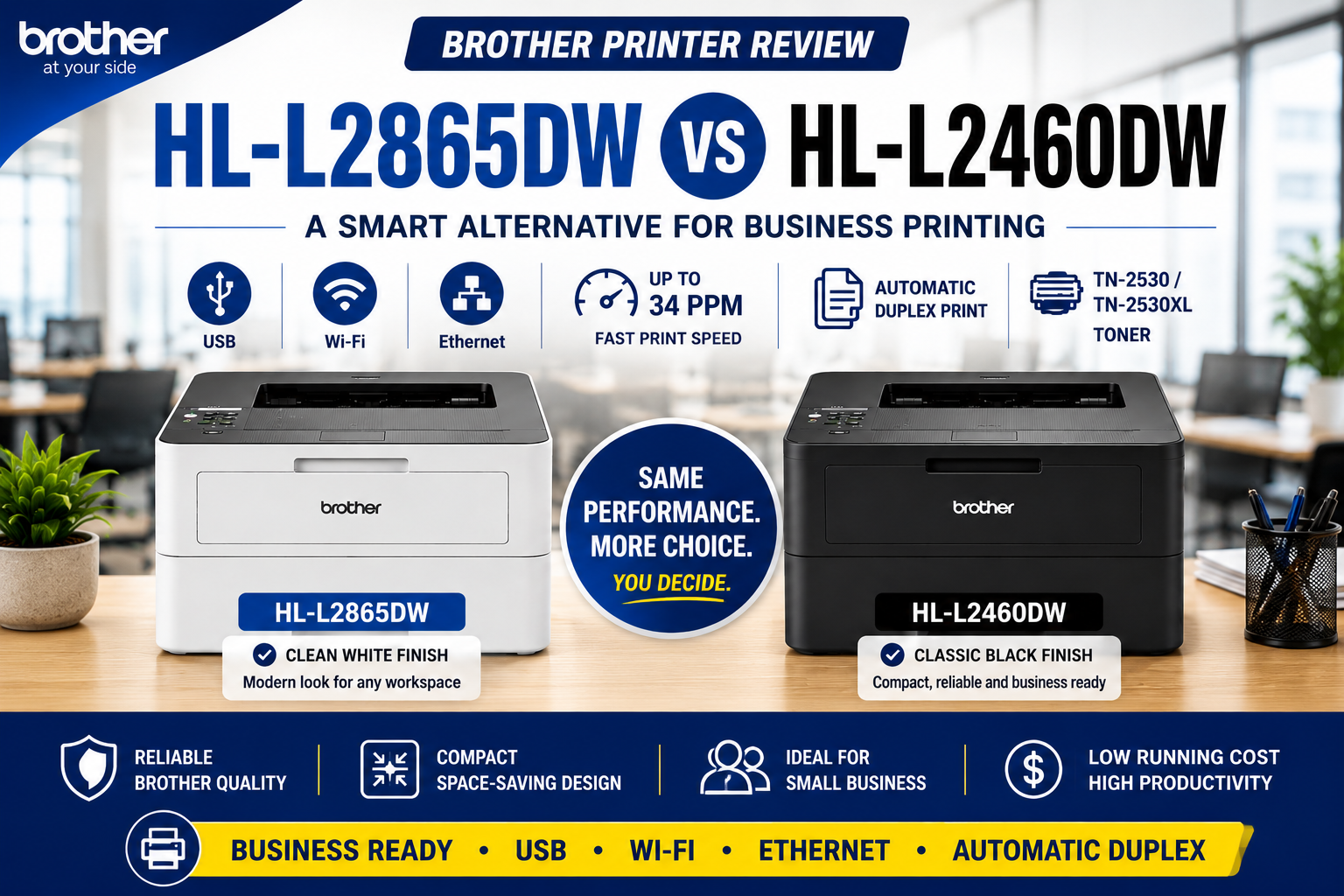
Brother HL-L2865DW Review – A Smart Alternative to the HL-L2460DW
If you are comparing Brother compact mono laser printers, it is easy to get confused by the many similar model numbers: HL-L2400DW, HL-L2445DW, HL-L2460DW and HL-L2865DW.
At first glance, they all look like compact black-and-white laser printers. However, the differences in speed, connectivity and toner capacity can make a big difference for home office and small business users.
In this review, we explain why the Brother HL-L2865DW is one of the smartest choices in Brother’s compact mono laser printer range — especially if you need a printer that can be shared reliably by multiple users in an office environment.
Quick Verdict
The Brother HL-L2865DW is ideal for customers who want a compact mono laser printer with USB, Wi-Fi and Ethernet connectivity.
Compared with entry-level models such as the HL-L2400DW, the HL-L2865DW is much better suited to small office and workgroup use because it supports wired network printing.
Compared with the popular HL-L2460DW, the HL-L2865DW delivers virtually the same everyday printing experience. The biggest visible difference is the printer colour: the HL-L2460DW is black, while the HL-L2865DW comes in a clean white finish.
Our recommendation: If you want a reliable Brother mono laser printer with USB, Wi-Fi, Ethernet and automatic duplex printing, the Brother HL-L2865DW is an excellent choice for business and home office users.
Why Ethernet Matters for Business Printing
Many home users are happy with Wi-Fi printing. However, business customers often prefer a wired Ethernet connection because it is generally more stable and easier to share across multiple users.
In an office environment, a printer may be connected to a network switch, patch panel or wall data point. This allows several staff members to print through the office network without relying on Wi-Fi signal strength.
This is where the Brother HL-L2865DW becomes especially useful. It gives users three practical connection options:
- USB – for direct connection to one computer
- Wi-Fi – for flexible wireless printing
- Ethernet – for stable office network printing
For small businesses, clinics, accounting firms, schools, warehouses and admin offices, Ethernet can be the feature that makes the printer suitable for shared workplace use.
Brother HL-L2865DW vs HL-L2460DW
Many customers searching for the Brother HL-L2460DW may also consider the HL-L2865DW. From a practical printing point of view, these two models are extremely close.
| Feature | Brother HL-L2460DW | Brother HL-L2865DW | Practical Difference? |
|---|---|---|---|
| Printer Type | A4 mono laser printer | A4 mono laser printer | Same category |
| Print Speed | Up to 34ppm | Up to 34ppm | Same |
| Automatic Duplex | Yes | Yes | Same |
| USB | Yes | Yes | Same |
| Wi-Fi | Yes | Yes | Same |
| Ethernet | Yes | Yes | Same |
| High-Yield Toner Option | Available | Available | Same class |
| Colour | Black | White | Cosmetic difference |
For everyday office printing, most users will not notice a meaningful performance difference between the HL-L2460DW and HL-L2865DW.
If you prefer a clean white printer for a modern office, clinic, reception desk or home workspace, the HL-L2865DW is a very attractive alternative.
How Does HL-L2865DW Compare with HL-L2400DW and HL-L2445DW?
The HL-L2865DW also sits above more basic Brother compact mono laser printers.
| Model | Speed | USB | Wi-Fi | Ethernet | Best For |
|---|---|---|---|---|---|
| HL-L2400DW | Up to 30ppm | Yes | Yes | No | Basic home use |
| HL-L2445DW | Up to 32ppm | Yes | Yes | Yes | Home office / light office use |
| HL-L2865DW | Up to 34ppm | Yes | Yes | Yes | Small business / shared office printing |
The HL-L2400DW is suitable for basic printing, but it does not include Ethernet. The HL-L2445DW adds Ethernet, but the HL-L2865DW steps up again with faster 34ppm printing and stronger business positioning.
That makes the HL-L2865DW a better choice for customers who want a compact printer that can handle regular business use, shared printing and higher-volume mono documents.
Why Choose the Brother HL-L2865DW?
- USB, Wi-Fi and Ethernet for flexible setup
- 34ppm print speed for productive office printing
- Automatic duplex printing to save paper
- High-yield toner support for lower running costs
- Compact design for desks, counters and small offices
- Clean white finish suitable for modern workspaces
The HL-L2865DW is especially useful when more than one person needs access to the printer. Instead of relying only on Wi-Fi, the printer can be connected by Ethernet for more stable shared printing.
Who Should Buy the Brother HL-L2865DW?
The Brother HL-L2865DW is a strong match for:
- Small businesses
- Accounting and admin offices
- Medical clinics and reception desks
- Schools and education offices
- Warehouses and dispatch desks
- Home offices needing reliable mono printing
- Users who prefer a white printer over a black model
Recommended Choice: Brother HL-L2865DW
If you are looking for a compact Brother mono laser printer with USB, Wi-Fi, Ethernet, automatic duplex printing and strong business usability, the HL-L2865DW is our recommended choice.
It delivers the key features most business users need, while the clean white finish makes it a great fit for modern offices and professional workspaces.
Final Recommendation
If you only need the cheapest possible mono laser printer, a lower model may be enough. But if you want a compact Brother printer that is better suited to office use, shared network printing and business productivity, the Brother HL-L2865DW is a smarter long-term choice.
It offers the connection flexibility many business users need: USB, Wi-Fi and Ethernet. It also compares very closely with the popular HL-L2460DW in real-world printing performance, with the main visible difference being the white finish.
Our verdict: Choose the Brother HL-L2865DW if you want a compact, reliable and business-ready mono laser printer with full connectivity and excellent day-to-day usability.
Frequently Asked Questions
Is Brother HL-L2865DW the same as HL-L2460DW?
The two models are very similar in everyday printing performance. Both are compact A4 mono laser printers with fast print speed, automatic duplex printing, USB, Wi-Fi and Ethernet. The most obvious difference is the colour: HL-L2460DW is black, while HL-L2865DW is white.
Does the Brother HL-L2865DW have Ethernet?
Yes. The Brother HL-L2865DW includes Ethernet, Wi-Fi and USB connectivity, making it suitable for shared office printing.
Why is Ethernet important for office printing?
Ethernet allows the printer to connect directly to a wired office network. This is often more stable than Wi-Fi and is preferred by many businesses for shared printing.
Should I buy HL-L2400DW or HL-L2865DW?
If you only need basic home printing, the HL-L2400DW may be enough. If you need Ethernet and stronger office usability, the HL-L2865DW is the better choice.
Should I buy HL-L2445DW or HL-L2865DW?
The HL-L2445DW is suitable for light office use, but the HL-L2865DW offers faster 34ppm printing and stronger business positioning, making it a better option for shared office environments.
What toner does Brother HL-L2865DW use?
The Brother HL-L2865DW uses the Brother TN-2530 toner family, including high-yield options depending on availability.
Is the Brother HL-L2865DW good for small business?
Yes. With USB, Wi-Fi, Ethernet and automatic duplex printing, the Brother HL-L2865DW is well suited to small business, home office and shared workplace printing.
Is the white colour an advantage?
For many users, yes. The white finish can blend more naturally into modern offices, clinics, reception areas and home workspaces.