
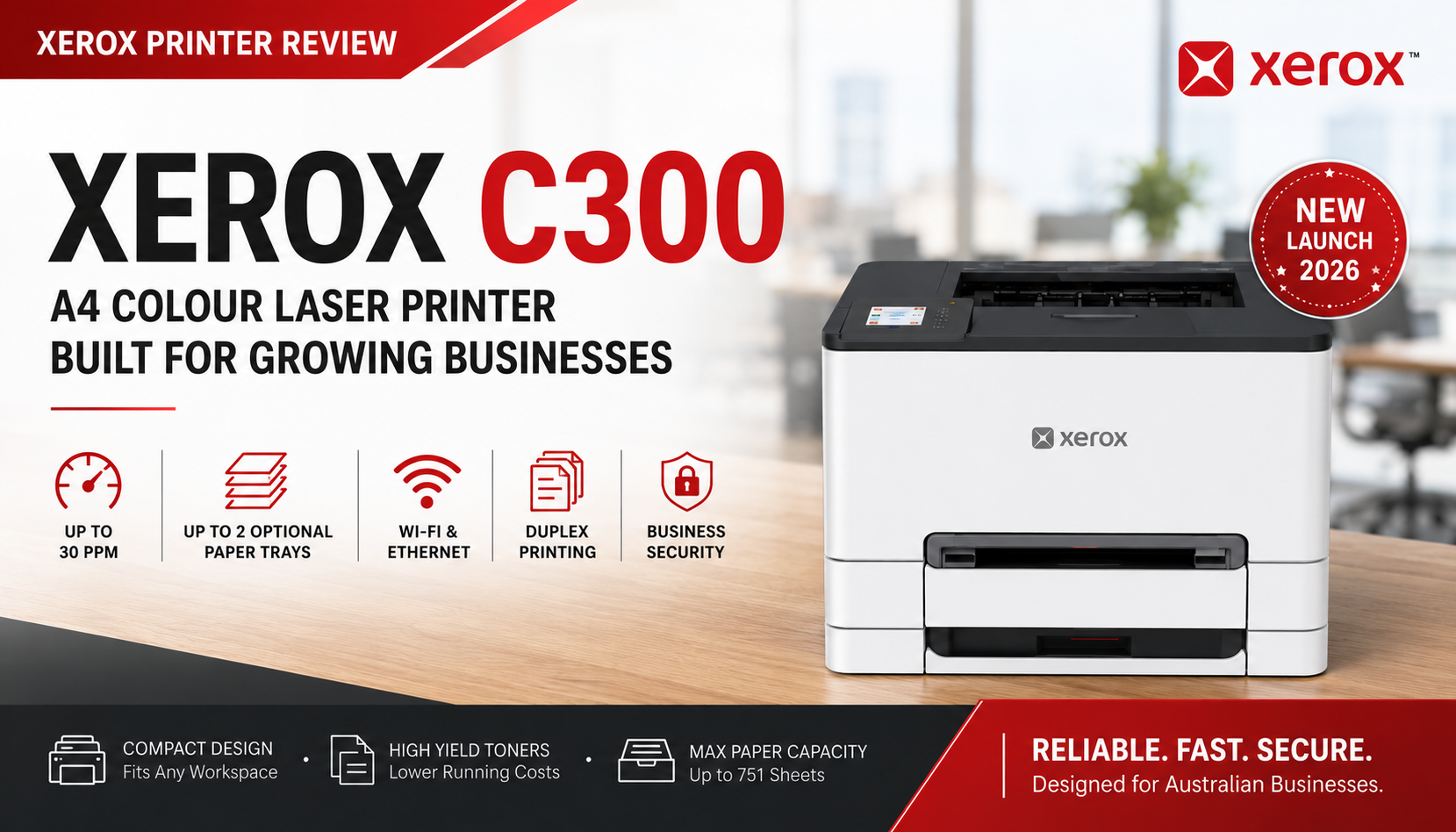
Xerox C300 Review – A Compact Colour Laser Printer Built for Growing Businesses
The Xerox C300 A4 Colour Laser Printer is designed for businesses that need fast, dependable colour printing without paying for copy, scan or fax functions they may never use.
Delivering colour and black-and-white print speeds of up to 30 pages per minute, the C300 combines a compact desktop footprint with automatic duplex printing, wired and wireless networking, a 2.8-inch colour touchscreen and unusually flexible paper expansion.
Two features make the Xerox C300 particularly interesting for Australian small businesses and professional workgroups:
- It can accept up to two optional 250-sheet paper trays.
- It offers Standard, High Yield and Extra High Yield toner cartridges, allowing businesses to match their consumable costs to their actual print volume.
In this Xerox C300 review, we examine its design, print performance, paper handling, toner options, running costs, connectivity and ideal customer base.
Quick Verdict
The Xerox C300 is an excellent choice for a small business or professional workgroup that primarily needs colour printing rather than scanning or copying.
It is compact enough for a desk or office cabinet, but its 30ppm print engine, Gigabit Ethernet, dual-band Wi-Fi, automatic duplex printing and expandable paper capacity make it more capable than many entry-level colour printers.
The availability of three toner-capacity levels is also a major advantage. Low-volume users can avoid purchasing oversized cartridges, while busier workgroups can choose Extra High Yield toner to reduce cartridge changes and lower their effective cost per page.
Our verdict: the Xerox C300 is especially well suited to growing businesses that want a compact colour printer today, but may need greater paper capacity and lower running costs as print volumes increase.
Xerox C300 Key Specifications
| Product Type | A4 colour laser printer |
| Australian Part Number | 100S15048 |
| Print Speed | Up to 30ppm A4 in colour and black |
| Automatic Duplex | Standard |
| Print Resolution | Up to 2400 × 600 dpi / 4800 Colour Quality |
| Processor | 1GHz dual-core processor |
| Memory | 1GB standard memory |
| Display | 2.8-inch colour touchscreen |
| Standard Paper Input | 250-sheet tray plus single-sheet manual feed |
| Optional Paper Input | Up to two optional 250-sheet trays |
| Maximum Paper Capacity | Up to approximately 751 sheets including manual feed |
| Connectivity | USB, Gigabit Ethernet and dual-band Wi-Fi |
| Recommended Monthly Volume | Approximately 750 to 5,000 pages |
| Dimensions | 243.9 × 411.2 × 399.5 mm (H × W × D) |
| Weight | Approximately 16.6kg |
| Warranty | 1-Year Advanced Exchange Warranty |
Design and Footprint
With a footprint of approximately 411mm wide × 400mm deep and a height of only around 244mm, the Xerox C300 is compact for a business-class colour laser printer.
It can fit comfortably on:
- A standard office desk
- A printer cabinet
- A reception counter
- A shared administration workstation
- A warehouse or dispatch desk
- A home-office storage unit
The low-profile design is particularly helpful in offices where desktop space is limited. It also allows the C300 to sit beneath shelving more easily than many taller multifunction printers.
Although compact, the printer weighs approximately 16.6kg. This gives it a more substantial business feel than many lightweight entry-level printers and reflects its stronger print engine, paper path and toner system.
Who Is the Xerox C300 Designed For?
The Xerox C300 is not intended to be the cheapest personal colour printer. It is designed for businesses that require regular, dependable colour printing and want the flexibility to expand as their workload grows.
Ideal customer groups include:
- Accounting and finance teams printing reports, spreadsheets and client correspondence
- Legal and professional offices producing contracts, presentations and colour-coded documents
- Medical clinics printing patient information, forms and internal reports
- Real estate offices producing property information and presentation documents
- Schools and training organisations printing course materials and administration documents
- Warehouses and dispatch departments using different trays for invoices, forms and standard paper
- Growing small businesses that need more paper capacity than an entry-level printer can provide
- Home offices requiring business-quality colour output and stable network connectivity
If your organisation already has a separate scanner or does not require copying, choosing a dedicated print-only device such as the C300 can provide better value than paying for multifunction features that will rarely be used.
Print Performance
The Xerox C300 prints A4 colour and black-and-white documents at speeds of up to 30 pages per minute.
This is fast enough for most small workgroups and professional offices. It allows employees to print multi-page reports, quotations, invoices and presentations without the lengthy waiting times often associated with entry-level colour printers.
The 1GHz dual-core processor and 1GB of memory help the printer manage:
- Large PDF files
- Colour presentations
- Multi-page reports
- Documents containing graphics and charts
- Jobs submitted by several network users
Automatic duplex printing is included as standard, allowing businesses to reduce paper consumption by printing on both sides of the page.
With print quality up to 2400 × 600 dpi and Xerox 4800 Colour Quality, the C300 is suitable for professional business documents, charts, reports, internal marketing material and customer-facing correspondence.
Up to Two Additional Paper Trays
One of the strongest reasons to choose the Xerox C300 is its unusually flexible paper-handling system.
The printer includes:
- A standard 250-sheet main paper tray
- A single-sheet manual feed slot
- Support for up to two optional 250-sheet paper trays
The optional tray is:
Xerox 097S05292 – Optional 250-Sheet Paper Tray
Installing two optional 097S05292 trays increases the printer's total paper capacity to approximately 751 sheets, including the single-sheet manual feed.
Why do two additional trays matter?
Many compact A4 colour printers support only one additional paper tray, or offer no expansion at all. The C300's ability to use two optional trays gives it a meaningful advantage for businesses that print on several media types.
A practical office configuration could be:
- Standard Tray: regular A4 office paper
- Optional Tray 2: company letterhead
- Optional Tray 3: coloured paper, invoices or pre-printed forms
- Manual Feed: envelopes, labels or occasional specialty media
This reduces the need for employees to repeatedly remove paper, reload different media and change printer settings throughout the day.
It is particularly valuable for:
- Accounting practices printing invoices and reports
- Legal offices using letterhead and plain paper
- Medical clinics using forms and patient handouts
- Warehouses producing dispatch paperwork and invoices
- Schools printing on standard and coloured paper
- Businesses that want larger paper capacity with fewer refills
View the Xerox 097S05292 optional 250-sheet paper tray
Three Toner Levels for Different Print Volumes
The other major strength of the Xerox C300 is its flexible toner range.
Instead of forcing every customer into one cartridge capacity, Xerox offers three toner levels:
- Standard Yield
- High Yield
- Extra High Yield
This allows customers to choose cartridges based on their actual monthly volume, cash-flow preference and cost-per-page requirements.
Standard-Yield Toner: Best for Light Users
Standard-yield toner is most suitable for businesses with lighter or occasional colour-printing requirements.
These cartridges have a lower upfront purchase price, making them suitable for users who want to minimise immediate consumable expenditure and do not print enough to justify a larger cartridge.
| Colour | Part Number | Approximate Yield |
|---|---|---|
| Black | 006R05051 | 1,300 pages |
| Cyan | 006R05052 | 1,200 pages |
| Magenta | 006R05053 | 1,200 pages |
| Yellow | 006R05054 | 1,200 pages |
Best suited to:
- Home offices
- Occasional colour printing
- Low-volume professional users
- Businesses with limited upfront consumable budgets
High-Yield Toner: Balanced Value for Regular Business Printing
High-yield cartridges provide a useful middle ground between purchase price and long-term cost per page.
They are ideal for businesses that print regularly but may not yet need the maximum-capacity Extra High Yield range.
| Colour | Part Number | Approximate Yield |
|---|---|---|
| Black | 006R05071 | 4,000 pages |
| Cyan | 006R05072 | 2,500 pages |
| Magenta | 006R05073 | 2,500 pages |
| Yellow | 006R05074 | 2,500 pages |
Best suited to:
- Small businesses
- Regular office printing
- Workgroups with moderate monthly volumes
- Customers seeking better cost per page without the highest upfront cartridge cost
Extra High Yield Toner: Lowest Running Cost for Busy Workgroups
The Extra High Yield cartridges are the most important consumable option for businesses printing at higher volumes.
They provide significantly greater page yields and reduce how often staff need to replace cartridges. Although the initial purchase price is higher, the effective cost per page is generally lower than with standard-yield cartridges.
| Colour | Part Number | Approximate Yield |
|---|---|---|
| Black | 006R05091 | 6,210 pages |
| Cyan | 006R05092 | 6,400 pages |
| Magenta | 006R05093 | 6,400 pages |
| Yellow | 006R05094 | 6,400 pages |
Best suited to:
- Busy offices and shared workgroups
- Accounting, legal and professional-service firms
- Schools and administration departments
- Businesses printing several thousand pages per month
- Customers prioritising lower cost per page and fewer cartridge changes
Published cartridge yields are approximate and normally based on applicable ISO testing standards. Actual yields vary according to page coverage, print content, colour usage, environmental conditions and printer settings.
Which Toner Capacity Should You Choose?
| Toner Level | Upfront Cost | Cost Per Page | Best Customer |
|---|---|---|---|
| Standard Yield | Lowest | Highest of the three | Light and occasional users |
| High Yield | Moderate | Better | Regular small-business printing |
| Extra High Yield | Highest | Lowest | Busy workgroups and higher-volume offices |
This three-level toner strategy is one reason the Xerox C300 can suit such a broad range of users. A small office can start with standard or high-yield toner, then move to Extra High Yield cartridges as its printing requirements grow.
Browse genuine Xerox C300 toner cartridges
Waste Toner Bottle
The Xerox C300 also uses the genuine Xerox 008R08165 Waste Toner Bottle, with an approximate service yield of up to 15,000 pages.
View Xerox 008R08165 Waste Toner Bottle
Connectivity and Mobile Printing
The Xerox C300 supports a complete range of business connection options:
- USB: direct connection to a computer
- Gigabit Ethernet: stable wired network sharing
- Dual-band Wi-Fi: flexible wireless deployment
- Front USB host: direct printing from compatible USB storage
- Apple AirPrint: mobile printing from supported Apple devices
- Mobile-printing support: convenient printing from compatible phones and tablets
Ethernet connectivity is especially important for business customers. It allows the C300 to be connected physically to an office network, providing a stable shared printer for several employees without depending entirely on Wi-Fi signal strength.
Security and Business Deployment
The Xerox C300 is built for business environments rather than basic personal use. Its security features are designed to help protect the device, documents and network connections.
The new Xerox C-Series platform also introduces future-ready security technologies, including support for post-quantum cryptography capabilities as part of Xerox's broader security strategy.
This is relevant for organisations that handle:
- Client and customer records
- Financial documents
- Employee information
- Medical or patient-related documents
- Commercially sensitive reports
Warranty and Long-Term Support
The Xerox C300 includes a 1-Year Advanced Exchange Warranty, subject to Xerox warranty terms and eligibility requirements.
Advanced Exchange coverage is designed to reduce downtime by providing a replacement-device pathway for eligible hardware faults after Xerox technical assessment.
Optional extended Advanced Exchange warranty plans are also available separately, with coverage options that may extend beyond the included one-year period.
This is helpful for businesses that want predictable protection and prefer not to rely only on a standard return-to-base warranty.
Advantages of the Xerox C300
- Fast 30ppm A4 colour and black printing
- Compact 411 × 400mm desktop footprint
- Automatic duplex printing
- 2.8-inch colour touchscreen
- USB, Gigabit Ethernet and dual-band Wi-Fi
- Direct printing from compatible USB storage
- Up to two optional 250-sheet paper trays
- Maximum input capacity of approximately 751 sheets
- Three toner-capacity levels
- Extra High Yield colour cartridges up to 6,400 pages
- Suitable for monthly print volumes up to approximately 5,000 pages
- Business-focused security
- 1-Year Advanced Exchange Warranty
Points to Consider
- The Xerox C300 is a print-only device and does not include copying or scanning.
- Customers needing an Automatic Document Feeder should consider the Xerox C245 multifunction printer.
- The optional 250-sheet trays are sold separately.
- Extra High Yield toner costs more upfront, although it generally provides better long-term value.
- At 16.6kg, the C300 is substantial and should be placed on a stable desk or cabinet.
If your office needs print, copy and scan functions in one machine, consider the related Xerox C245 Colour Multifunction Printer.
Final Verdict
The Xerox C300 is a thoughtfully designed for small businesses and growing professional workgroups.
Its compact size makes it easy to deploy in smaller offices, but its performance and expansion options place it above many basic desktop colour printers.
The ability to add two optional Xerox 097S05292 250-sheet trays is a genuine competitive advantage. It gives businesses the flexibility to hold several paper types or increase total capacity without moving to a much larger printer.
The three-tier consumable system is equally important. Standard Yield cartridges support lighter users, High Yield cartridges provide a practical balance for regular printing, and Extra High Yield cartridges help busy workgroups reduce their running cost and replacement frequency.
OzToner rating: 4.8 out of 5
Recommended for: small businesses, professional offices and shared workgroups requiring fast colour output, strong network connectivity, expandable paper capacity and flexible long-term toner costs.
Ready to Upgrade Your Business Colour Printing?
The Xerox C300 combines fast 30ppm printing, compact dimensions, business-class connectivity and support for up to two additional 250-sheet paper trays.
Choose from Standard, High Yield and Extra High Yield genuine Xerox toner cartridges to match your print volume and operating budget.
Frequently Asked Questions
Is the Xerox C300 worth buying?
Yes. The Xerox C300 is a strong choice for small businesses and professional workgroups that need fast, reliable A4 colour printing without scanning or copying. Its expandable paper handling and three toner-capacity levels give it good long-term flexibility.
How fast is the Xerox C300?
The Xerox C300 prints A4 colour and black-and-white documents at speeds of up to 30 pages per minute.
What are the dimensions of the Xerox C300?
The Xerox C300 measures approximately 243.9mm high, 411.2mm wide and 399.5mm deep. It weighs approximately 16.6kg.
Can the Xerox C300 add two extra paper trays?
Yes. The Xerox C300 can support up to two optional 250-sheet paper trays, providing a maximum paper capacity of approximately 751 sheets including the manual feed.
What is the part number for the Xerox C300 optional paper tray?
The compatible optional 250-sheet paper tray is Xerox part number 097S05292.
Can I install only one optional tray?
Yes. You may install one optional 097S05292 tray or configure the printer with two trays, depending on your paper-capacity requirements.
What toner does the Xerox C300 use?
The Xerox C300 uses the new Xerox C300 toner family, available in Standard Yield, High Yield and Extra High Yield black, cyan, magenta and yellow cartridges.
What are the Standard Yield Xerox C300 toner numbers?
The Standard Yield cartridges are 006R05051 black, 006R05052 cyan, 006R05053 magenta and 006R05054 yellow.
What are the High Yield Xerox C300 toner numbers?
The High Yield cartridges are 006R05071 black, 006R05072 cyan, 006R05073 magenta and 006R05074 yellow.
What are the Extra High Yield Xerox C300 toner numbers?
The Extra High Yield cartridges are 006R05091 black, 006R05092 cyan, 006R05093 magenta and 006R05094 yellow.
What is the highest-yield toner for the Xerox C300?
The Extra High Yield black cartridge has an approximate yield of 6,210 pages, while the Extra High Yield cyan, magenta and yellow cartridges each provide an approximate yield of 6,400 pages.
Which Xerox C300 toner gives the lowest cost per page?
For businesses with sufficient print volume, the Extra High Yield cartridges generally provide the lowest effective cost per page because their higher capacity spreads the cartridge cost across more printed pages.
Does the Xerox C300 support automatic duplex printing?
Yes. Automatic two-sided printing is included as a standard feature.
Does the Xerox C300 have Ethernet?
Yes. The Xerox C300 includes Gigabit Ethernet, dual-band Wi-Fi and USB connectivity, making it suitable for shared office network printing.
Does the Xerox C300 support Apple AirPrint?
Yes. The Xerox C300 supports Apple AirPrint and compatible mobile-printing environments.
Can the Xerox C300 print from a USB drive?
Yes. It includes a front USB host connection for direct printing of compatible files from supported USB storage devices.
Does the Xerox C300 scan or copy?
No. The Xerox C300 is a dedicated single-function printer. Customers requiring print, copy and scan should consider the Xerox C245 colour multifunction printer.
What is the recommended monthly print volume?
The recommended monthly print volume is approximately 750 to 5,000 pages, making the C300 suitable for small workgroups and growing businesses.
What warranty is included?
The Xerox C300 includes a one-year Advanced Exchange Warranty, subject to Xerox warranty terms. Optional extended warranty plans may also be purchased separately.
Who should buy the Xerox C300?
The C300 is best suited to small businesses, accounting and legal offices, clinics, schools, warehouses and professional workgroups that need fast colour printing, stable network connectivity and expandable paper capacity.